

English
Introduction
Ream is a framework for building web applications and APIs in TypeScript, on Node.js. You write your application in TypeScript. The parts that need speed, such as the HTTP server, are written in Rust and ship already compiled: you never write Rust.
This page explains the basic ideas. To build a first application right away, follow the tutorial.
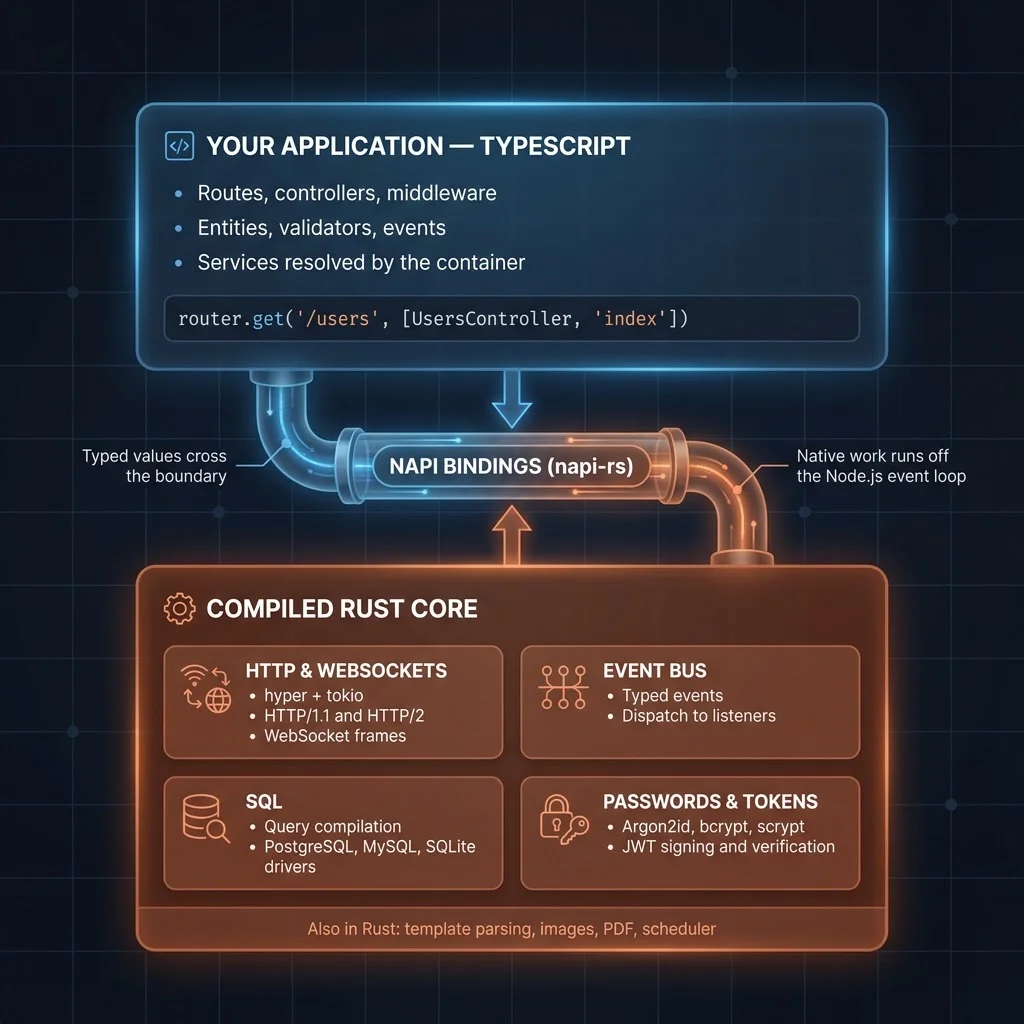
What an application looks like
A route connects a URL to a controller method:
typescript
// app/modules/task/routes.ts
import router from '@c9up/ream/services/router'
import TasksController from './controllers/TasksController.js'

router.get('/tasks', [TasksController, 'index'])
router.post('/tasks', [TasksController, 'store'])
router.get('/tasks/:id', [TasksController, 'show'])
The controller receives the request and sends a response. The services it needs arrive through its constructor:
typescript
// app/modules/task/controllers/TasksController.ts
import { inject } from '@c9up/ream'
import type { HttpContext } from '@c9up/ream'
import { TaskService } from '../services/TaskService.js'

@inject()
export default class TasksController {
  constructor(private tasks: TaskService) {}

  async index({ response }: HttpContext) {
    response.json({ data: await this.tasks.findAll() })
  }
}
You never create the controller yourself. On every request, ream builds it with a TaskService ready to use.
What ream gives you
Everything is typed. The request, the configuration and the errors have TypeScript types. Your editor completes your code and points out mistakes before you run it.
Your code is organised by domain. Each feature of your application lives in its own folder, its module: app/modules/task/, app/modules/user/. A module holds its controllers, services, entities, validators and its routes.ts file. Ream loads every module's routes.ts by itself: there is no central list of routes to keep up to date.
Rust does the heavy lifting. The HTTP server, the event bus, password hashing and JWT signing run in Rust. They do not block the Node.js event loop, and your application ships no cryptography library written in JavaScript.
Every package stands alone. Ream is split into packages: database, authentication, validation, mail, and more. You install only the ones you need.
The main packages
| Package | What it is for |
|---|---|
@c9up/ream | The core: the container, the router, the HTTP server, the application startup |
@c9up/atlas | Reading and writing the database (ORM) |
@c9up/warden | Identifying users and checking what they may do |
@c9up/transit | Signing in with an outside account (SAML 2.0, LDAP, OpenID Connect, OAuth 1 and 2) |
@c9up/rune | Validating incoming data |
@c9up/spectrum | Writing logs |
The full list of packages groups them by domain.
Four ideas to know
The container builds your classes
The container is the object that creates instances of your classes. It reads the constructor's parameters and provides what is needed. This is called dependency injection.
@inject(): the container creates a new instance every time one is asked for (container.make()). Use it for controllers.@Service(): the container creates one instance and reuses it everywhere (a singleton).@Inject('name'): the container provides what was registered under that name.
A route points to a controller
A route names the controller class and its method: [TasksController, 'index']. When the request arrives, the container builds the controller with its dependencies, then calls the method.
Providers set up services
A provider is a class that sets up a service at startup: it registers it in the container, opens a connection, checks a configuration.
typescript
import { Provider } from '@c9up/ream'

export default class AppProvider extends Provider {
  register() {
    // Synchronous: register services in the container
    this.app.container.singleton('mailer', () => new Mailer(
      this.app.config.get('mail')
    ))
  }

  async boot() {
    // Asynchronous: check a connection, validate the configuration
  }
}
The application starts in four steps
- register: each provider registers its services in the container. Nothing asynchronous happens here.
- boot: each provider prepares its services. Database connections open and the configuration is checked.
- start: ream imports the startup files (
start/kernel.ts) and every module'sroutes.ts. The server does not accept requests yet. - ready: the server accepts requests, then each provider runs its
ready()method.
When the application stops, each provider runs its shutdown() method, starting with the last one registered.
How a request travels
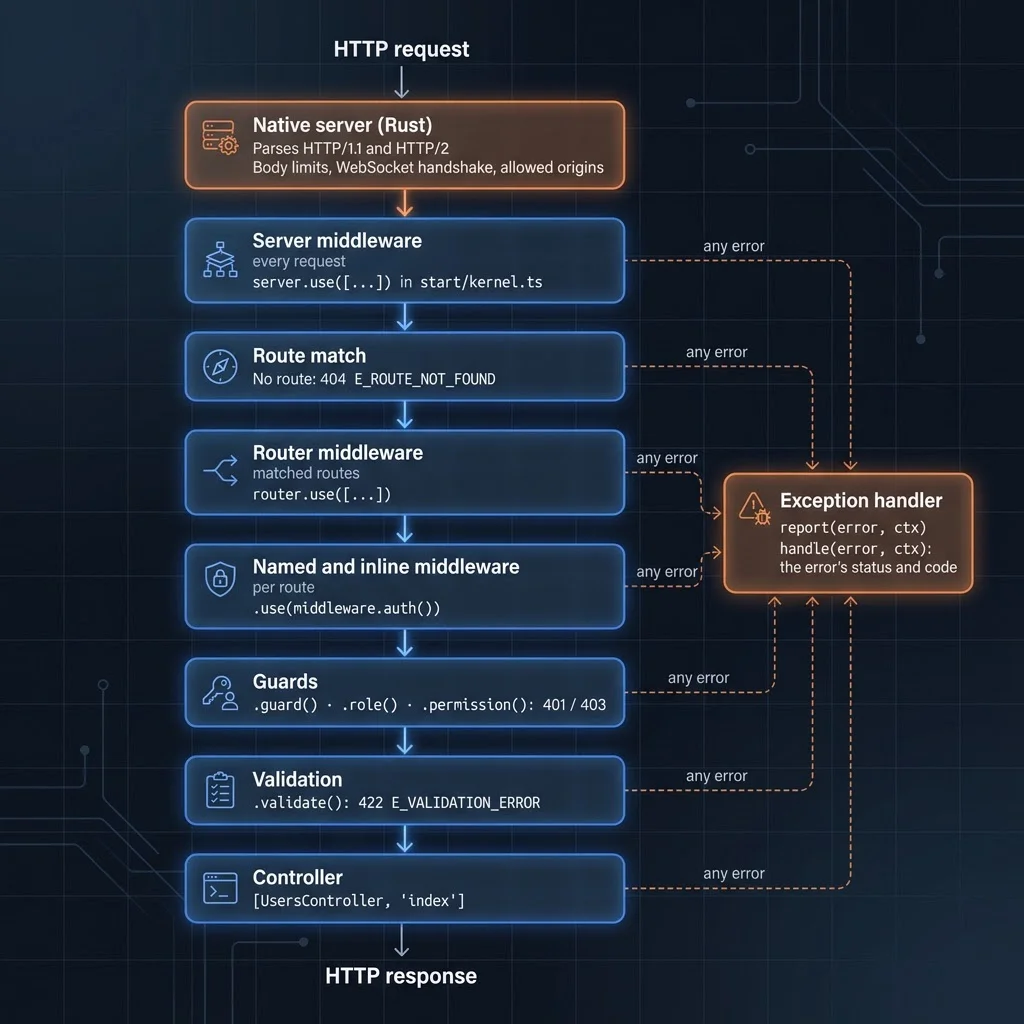
The Rust server receives the request and passes it to the HttpKernel, a TypeScript function. The kernel runs the middleware, finds the route and calls your controller. The Rust server then sends the response back to the client. So all of your application's logic stays in TypeScript.
The parts written in Rust
- The HTTP server is built on Hyper, a proven Rust HTTP library. It hands every request to the
HttpKernelthrough a single function,onRequest(callback). - The event bus (
@c9up/ream/events) dispatches events in Rust. You emit and subscribe to events in TypeScript, with full types. - Password hashing (Argon2id by default, bcrypt and scrypt too) is done in Rust by
@c9up/sigil. JWTs are signed and verified in Rust by@c9up/warden. Comparisons run in constant time: how long they take reveals nothing about the secret.
Decorators
Ream uses TypeScript decorators, the @ annotations placed before a class or a method. The project that ream new creates already turns on the two options they need:
json
{
  "compilerOptions": {
    "experimentalDecorators": true,
    "emitDecoratorMetadata": true
  }
}| Decorator | Package | What it does |
|---|---|---|
@inject() | @c9up/ream | The container builds a new instance on every request for it (controllers) |
@Service() | @c9up/ream | The container builds one shared instance (singleton) |
@Inject('token') | @c9up/ream | Injects what was registered under that name |
@Lazy() | @c9up/ream | Resolves two classes that depend on each other |
@Entity() | @c9up/atlas | Makes a class a database table |
@Guard('jwt') | @c9up/warden | Requires a signed-in user (here through a JWT) for this method |
@Role('admin') | @c9up/warden | Requires a role |
@Permission('x') | @c9up/warden | Requires a permission |
Full framework or toolkit
You can use ream in two ways.
The full framework: ream follows its conventions. It reads reamrc.ts, starts the providers, loads the modules' routes and goes through the four startup steps. This is what ream new creates:
typescript
// bin/server.ts
import { Ignitor, defineConfig } from '@c9up/ream'

new Ignitor(new URL('../', import.meta.url), {
  importer: (path) => import(path),
  port: 3000,
})
  .httpServer()
  .useRcFile(defineConfig({
    providers: [() => import('#providers/AppProvider.js')],
    preloads: [() => import('#start/kernel.js')],
    modules: { path: './app/modules', autoload: ['routes'] },
  }))
  .start()
The toolkit: you take only the pieces you want, and wire the router, the middleware and the kernel yourself. This is useful for a small microservice, or to add ream to an existing Node.js application.
What next
- The tutorial: build a complete task API, step by step
- The folder structure: where each file goes, and why
- The lifecycle: the four startup steps in detail
- The container: dependency injection, and how to swap it in tests