

English
Middleware
This guide covers middleware and the HTTP kernel:
- Middleware Classes
- The Kernel File
- Three Levels of Middleware
- Inline Middleware
- Execution Order
- Short-Circuiting
- Lazy Loading
- Writing Auth Middleware
- The HttpContext in Middleware
- Example
- Recommended middleware order
- Watch-out
Middleware intercepts HTTP requests before they reach the route handler. Ream uses an onion pattern: code before await next() runs on the way in, code after runs on the way out. All middleware is registered in start/kernel.ts.
Middleware Classes
The standard form is a class with a handle method. This matches the MiddlewareClass interface expected by server.use() and router.use():
typescript
// app/middleware/log_request_middleware.ts
import type { HttpContext } from '@c9up/ream'

export default class LogRequestMiddleware {
  async handle(ctx: HttpContext, next: () => Promise<void>) {
    const start = Date.now()
    await next()
    const ms = Date.now() - start
    console.log(`${ctx.request.method()} ${ctx.request.path()} ${ctx.response.getStatus()} — ${ms}ms`)
  }
}
The Kernel File
Register all middleware in start/kernel.ts. This file is a preload — the Ignitor imports it before handling any requests:
typescript
// start/kernel.ts
import router from '@c9up/ream/services/router'
import server from '@c9up/ream/services/server'

// Custom error handler
server.errorHandler(() => import('#exceptions/handler.js'))

// Server middleware — runs on ALL requests, even 404s
server.use([
  () => import('#middleware/log_request_middleware.js'),
  () => import('#middleware/cors_middleware.js'),
])

// Router middleware — runs only on matched routes
router.use([
  // Parses request bodies — without it body(), input() and all() read `{}`
  () => import('@c9up/ream/bodyparser_middleware'),
  () => import('#middleware/auth_middleware.js'),
])

// Named middleware — must be explicitly assigned to routes
export const middleware = router.named({
  admin: () => import('#middleware/admin_middleware.js'),
  throttle: () => import('#middleware/throttle_middleware.js'),
})
Register the kernel as a preload in reamrc.ts:
typescript
// reamrc.ts
import { defineConfig } from '@c9up/ream'

export default defineConfig({
  preloads: [
    () => import('./start/kernel.js'),
  ],
  modules: { path: './app/modules' },
})
Three Levels of Middleware
Server Middleware
Registered via server.use(). Runs on every HTTP request — including requests that do not match any route. This is the right place for logging, CORS headers, and request tracing.
typescript
server.use([
  () => import('#middleware/log_request_middleware.js'),
])
Router Middleware
Registered via router.use(). Runs only when a route matches. Executes after server middleware and before any route-specific middleware:
typescript
router.use([
  // Parses request bodies — without it body(), input() and all() read `{}`
  () => import('@c9up/ream/bodyparser_middleware'),
  () => import('#middleware/auth_middleware.js'),
])
Named Middleware
Registered via router.named(). Must be explicitly assigned to individual routes or groups. The return value is a typed map — export it so route files can reference the names:
typescript
export const middleware = router.named({
  admin: () => import('#middleware/admin_middleware.js'),
  throttle: () => import('#middleware/throttle_middleware.js'),
})
Assign to a route:
typescript
router.get('/admin/dashboard', [AdminController, 'index']).middleware('admin')
router.post('/orders', [OrdersController, 'store']).middleware('throttle')
Assign to a group:
typescript
router.group(() => {
  router.get('/users', [UsersController, 'index'])
  router.post('/users', [UsersController, 'store'])
}).prefix('/admin').middleware('admin')
By name, a middleware runs with no arguments. To pass some, call its factory and attach the result with .use(). The arguments reach the third parameter of handle():
typescript
router.get('/reports', [ReportsController, 'index']).use(middleware.throttle({ max: 10 }))Every name given to .middleware() must be declared in router.named(). A misspelt name stops the application at boot with E_MIDDLEWARE_NOT_FOUND, which names the route. The request never runs without the middleware.
Inline Middleware
Attach a one-off middleware function directly to a route with .use(). Useful for route-specific logic that does not warrant a full class:
typescript
router.get('/report', [ReportController, 'index']).use(async (ctx, next) => {
  ctx.store.set('report-format', ctx.request.input('format', 'json'))
  await next()
})
Multiple inline middleware execute in the order they are chained:
typescript
router
  .post('/upload', [UploadController, 'store'])
  .use(validateContentType)
  .use(checkQuota)
Execution Order
gRPC calls skip the pipeline
A gRPC call served by Neutrino never goes through server, router or named middleware. Protect it with Neutrino's interceptors.
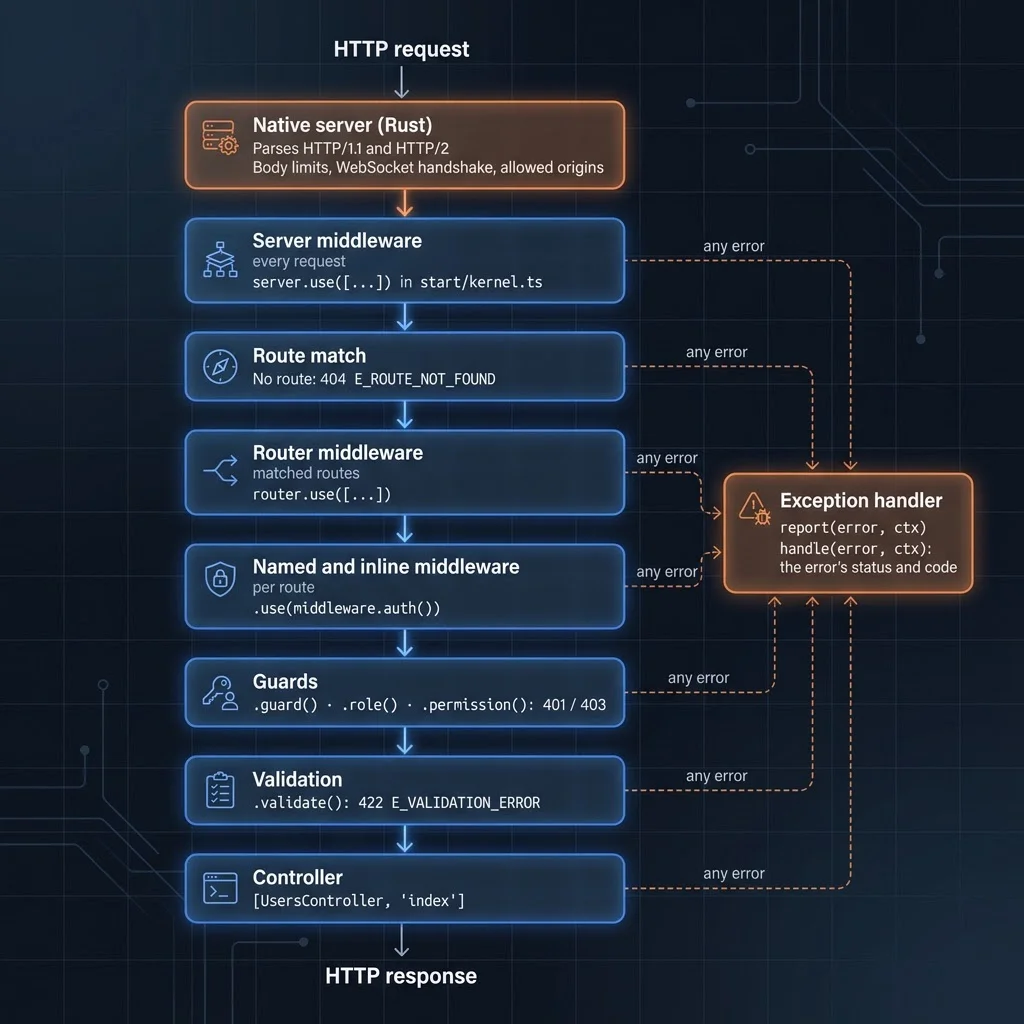
A request goes through these layers in this fixed order:
1. Server middleware        (server.use — runs on all requests)
2. Route match              (no route: 404 E_ROUTE_NOT_FOUND)
3. Router middleware        (router.use — runs on matched routes)
4. Named middleware         (route.middleware('name') or group.middleware('name'))
5. Inline middleware        (route.use(fn))
6. Guard enforcement        (route.guard / .role / .permission)
7. Validation               (route.validate('name'): 422 E_VALIDATION_ERROR)
8. Route handler
All layers wrap each other in the onion pattern, so code after await next() runs in reverse order:
typescript
// Example illustrating order
export default class TraceMiddleware {
  async handle(ctx: HttpContext, next: () => Promise<void>) {
    console.log('before handler')   // runs first
    await next()
    console.log('after handler')    // runs last
  }
}
Short-Circuiting
A middleware can stop the pipeline by not calling next(). The handler and all downstream middleware will not execute:
typescript
export default class MaintenanceModeMiddleware {
  async handle(ctx: HttpContext, next: () => Promise<void>) {
    if (process.env.MAINTENANCE === 'true') {
      ctx.response.status(503).json({ error: 'Service temporarily unavailable' })
      return   // next() is not called — pipeline stops here
    }
    await next()
  }
}
When an inner layer throws
An error thrown by the handler or by an inner middleware is turned into a response right where it is thrown: the exception handler runs there, then the next() of every outer middleware returns normally. The code after await next() still runs, and sees the error response already written (its status, its headers). That is how the session middleware saves the session of a request that failed, so a message an error flashes reaches the next request.
typescript
export default class TimingMiddleware {
  async handle(ctx: HttpContext, next: () => Promise<void>) {
    const started = Date.now()
    await next() // returns even when the handler threw
    ctx.response.header('x-response-time', `${Date.now() - started}ms`)
  }
}
So a try { await next() } catch does not see the errors of inner layers. To act on an error, give it a handle() method or extend the exception handler (see Exception handling).
Lazy Loading
All entries passed to server.use(), router.use(), and router.named() are lazy imports — functions that return a promise. The module is loaded on the first request that hits that middleware and then cached:
typescript
// This is a lazy import — the module is not loaded until needed
() => import('#middleware/heavy_middleware.js')
Direct middleware functions (two-parameter (ctx, next) functions) are also accepted when you do not need a class:
typescript
server.use([
  async (ctx, next) => {
    ctx.response.header('x-powered-by', 'Ream')
    await next()
  },
])
Writing Auth Middleware
A typical auth middleware reads a token, verifies it, and populates ctx.auth:
typescript
// app/middleware/auth_middleware.ts
import type { HttpContext } from '@c9up/ream'
import { TokenService } from '#services/token_service.js'

export default class AuthMiddleware {
  async handle(ctx: HttpContext, next: () => Promise<void>) {
    const header = ctx.request.header('authorization') ?? ''
    const token = header.replace(/^Bearer\s+/, '')

    if (token) {
      const payload = await TokenService.verify(token)
      if (payload) {
        ctx.auth = {
          isAuthenticated: true,
          // The guard that vouched for the request: `.guard('jwt')` on a
          // route lets it through only when this names one of its guards.
          authenticatedViaGuard: 'jwt',
          user: { id: payload.sub, email: payload.email },
          roles: payload.roles ?? [],
          permissions: payload.permissions ?? [],
        }
      }
    }

    await next()
  }
}
Once ctx.auth is populated, route-level guards (.guard('jwt'), .role('admin'), .permission('orders:write')) are enforced automatically by the pipeline — you do not need to check them manually in the middleware.
The HttpContext in Middleware
Every middleware receives the same HttpContext that flows through the full pipeline. Use ctx.store to pass data between middleware layers:
typescript
// Upstream middleware sets a value
ctx.store.set('tenant-id', resolveTenant(ctx.request))

// Downstream middleware or handler reads it — the store holds `unknown`, so narrow it
const tenantId = ctx.store.get('tenant-id')
if (typeof tenantId !== 'string') throw new Error('The tenant middleware did not run')
Key properties available in every middleware:
typescript
ctx.id                      // Correlation ID (x-request-id or UUID)
ctx.request.method()        // 'GET' | 'POST' | ...
ctx.request.path()          // '/api/users'
ctx.request.header('key')   // Single header value
ctx.request.ip()            // Client IP
ctx.auth                    // { isAuthenticated, user?, roles?, permissions? }
ctx.params                  // Route params { id: '...' }
ctx.response.status(code)   // Set response status (chainable)
ctx.response.header(k, v)   // Set response header (chainable)
ctx.response.json(data)      // Send JSON response
ctx.store                   // Per-request Map for passing data downstream
ctx.containerResolver       // Per-request IoC resolver: await ctx.containerResolver?.make(Service)
Resolving services in middleware
Resolve container-registered services through ctx.containerResolver instead of importing the application singleton. This keeps a middleware — especially one shipped as a standalone package — free of any @c9up/ream runtime import:
typescript
import type { HttpContext } from '@c9up/ream'
import { AuthManager } from '@c9up/warden'

export default class WardenMiddleware {
  async handle(ctx: HttpContext, next: () => Promise<void>) {
    const auth = await ctx.containerResolver?.make(AuthManager)
    // ...authenticate with `auth`, then:
    await next()
  }
}
ctx.containerResolver is the per-request resolver Ream builds with container.createResolver(); .make(token) resolves a class, string, or symbol token and returns a promise. This is how @c9up/warden and @c9up/blackhole consume host services while staying framework-agnostic.
It carries the rest of the resolver surface too — call(), hasBinding(), hasAllBindings(), and bindValue():
typescript
// Bound for THIS request only — no other request can see it
ctx.containerResolver?.bindValue(CurrentTenant, tenant)
Ream binds the HttpContext on every request, so a controller or a service it depends on can take it as a constructor dependency:
typescript
class Auditor {
  constructor(@inject(HttpContext) private ctx: HttpContext) {}
}
A singleton that reads a request-bound value while it is being built is not cached application-wide — it belongs to that request. One that reads none is cached exactly as before.
The values bound on a resolver are visible while that resolver's make() or call() runs, and no longer. A timer or a promise that a constructor starts during the build does not see them later: its make(HttpContext) fails with E_CONTAINER_NOT_FOUND, as it would outside any request. Pass what background work needs as plain data instead.
Contextual bindings
Give one class a different implementation of a dependency, leaving everyone else on the container's binding:
typescript
container.when(UsersController).asksFor(Hash).provide(() => new Argon2())
// or in one call
container.contextualBinding(UsersController, Hash, () => new Argon2())
It keys on the class that declares the dependency, not on an ancestor: if AdminController depends on PasswordService and PasswordService is the one asking for Hash, the binding to write is when(PasswordService).
resolveFor(parent, token) resolves as if parent had asked, on both the container and a request resolver.
Core composes Router + Middleware + Server to execute requests.
Example
ts
await new Ignitor()
  .httpServer()
  .use(async (ctx, next) => {
    const start = Date.now()
    await next()
    ctx.response.header('x-duration-ms', String(Date.now() - start))
  })
  .routes((router) => {
    router.get('/users/:id', async (ctx) => {
      ctx.response.json({ id: ctx.params.id })
    })
  })
  .start()
Recommended middleware order
- technical (request id, timing, body parser)
- security (cors, headers, shield, rate limit)
- auth/permissions
- business logic
Watch-out
Avoid middleware that swallows errors without rethrow/structured logging.