

English
Introduction
This guide covers native apps with orbit:
- Installation
- Wiring an app
- What maps to what
- Limits
- Errors
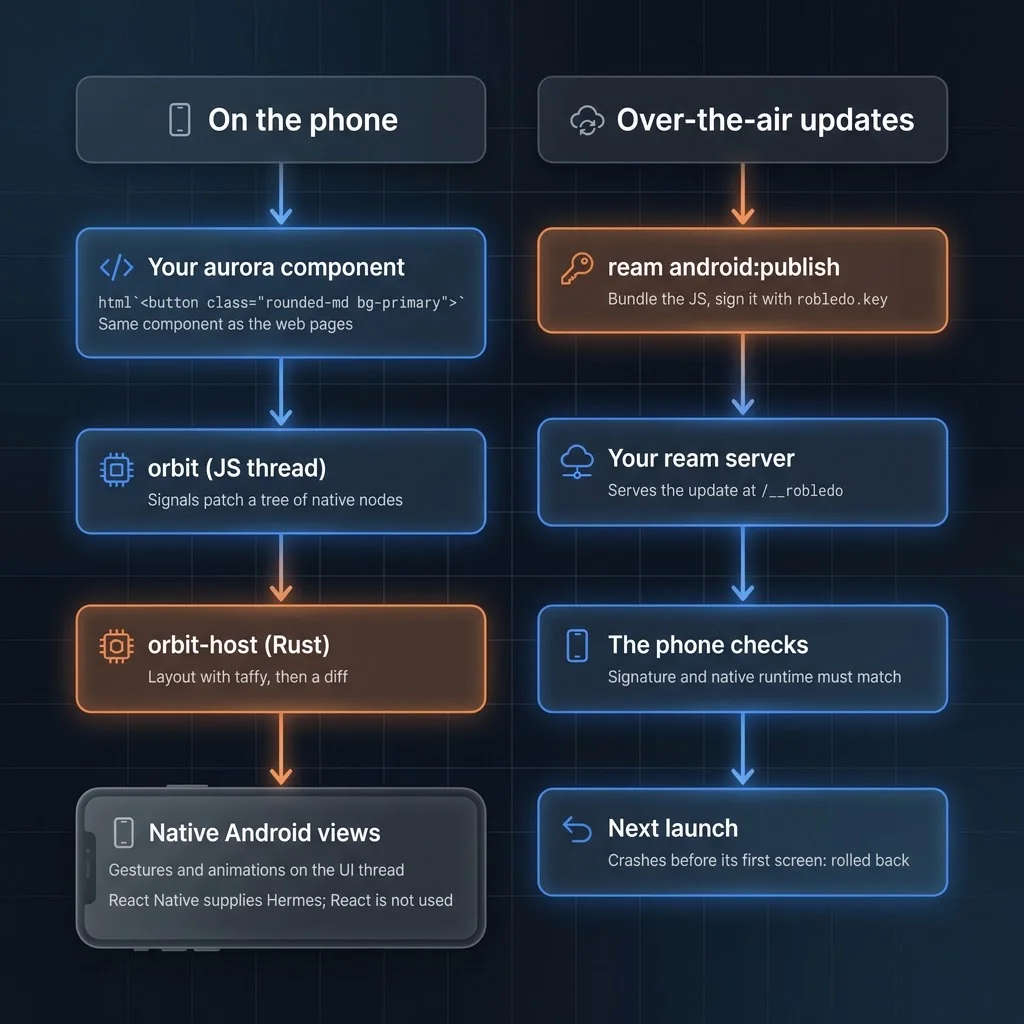
Orbit renders aurora components as native views on a phone. A component written with html, component, signals and Tailwind classes runs unchanged on Android: orbit keeps a tree of native nodes that aurora's signals patch, commits it to a Rust host (orbit-host) that lays it out with taffy, diffs it and hands mount operations to the platform's views. Gestures, animations and scroll-driven values run on the UI thread, so a busy JS thread does not freeze the screen.
React Native supplies the JS engine (Hermes), the module registry and the activity; React itself is not used.
Installation
bash
pnpm add @c9up/orbit @c9up/aurora react-native
pnpm add -D tailwindcss @tailwindcss/cli @react-native-community/cli @react-native/metro-config
The app is built by ream android:* from the mobile block of reamrc.ts — see Mobile apps in the CLI reference.
Wiring an app
ts
// mobile/index.ts — mobile.entry in reamrc.ts
import { run } from '@c9up/orbit/react-native'
import { App } from './App.js'

run(App)
ts
// mobile/App.ts
import { component, html, signal } from '@c9up/aurora/core'

export const App = component(() => {
  const count = signal(0)
  return html`<div class="flex-1 items-center justify-center gap-4 bg-background">
    <p class="text-2xl font-semibold">${() => count()}</p>
    <button class="rounded-md bg-primary px-4 py-2 text-primary-foreground" @click=${() => count(count() + 1)}>
      Add one
    </button>
  </div>`
})
run registers the app under the name the generated activity starts, gives orbit its native host and the app's style table, wires the Android back button, and mounts the root component. The generated activity passes it no launch props: the activity is the launcher, so any app on the phone can start it with extras of its choosing, and they never reach your component. Outside an app built by ream, useHost(host) and mount(App(), { viewport }) do the same by hand.
What maps to what
| Template | Native |
|---|---|
block elements (div, section, button, …) | a view |
p, h1–h6, label | a text |
inline elements (span, strong, em, …) | a run inside the surrounding text |
| text sitting in a view | wrapped in an anonymous text, as CSS does |
class="…" | the app's own Tailwind build (see Styles); text styles cascade |
a flex container | each child its own item; flex is a row, as on the web |
overflow-y-auto | a native scroll view around a content view |
overflow-hidden | children clipped to the box and its rounded corners |
shadow-* | a box shadow, drawn by the parent outside the box (Android 8+) |
backdrop-blur-* | what is behind the view, blurred (Android 12+) |
@click, @longpress, @pan, @swipe | gestures recognized natively (see Gestures) |
motion=${{ opacity, translateX, translateY, scale, visible }} | UI-thread animation (see Motion) |
scroll-y=${value} | the scroll offset feeds a MotionValue |
input, textarea | the platform's text field: typing never waits for JS |
@input, @change, @focus, @blur, Enter as @keydown | the field's events, event.target.value carrying the text |
img | an image view, decoded off the UI thread at the size it is shown |
svg | a vector view: paths, basic shapes and g (see Vector drawings) |
each(items, key, render) | one row per key: a kept row keeps its views and moves |
each(…, { lazy }) | only the rows in the nearest scroll view's viewport exist |
The root lays out inside the safe area: the status bar, the navigation bar, the display cutout and, when it is open, the keyboard.
Limits
- Not mapped yet:
select,canvas; inside ansvg,text,use, gradients and masks. - Known to the stylesheet but inert:
:has(), positional pseudo-classes (first:,last:),::before/::after, transforms, transitions, gradients,line-clamp;gridlays out as a column; one box shadow is drawn (the first visible one) and corners share one radius. - Accessibility and iOS are still to come.
Errors
| Code | Cause |
|---|---|
E_ORBIT_NO_HOST | mount ran before useHost gave orbit a native host, or the module is not orbit's. |
E_ORBIT_COMMIT_FAILED | The native host refused a commit; the message carries its report. What it carried is sent again with the next commit. |
E_ORBIT_TREE_TOO_DEEP | The views nest more than 100 levels deep: the host refuses the commit before it lays it out. |
E_ORBIT_SVG_VALUE | A value of an <svg> the host cannot read: that shape is left out, the rest drawn. Reported to mount's onError, never thrown. |
E_ORBIT_UNSUPPORTED_ELEMENT | An element with no native mapping (select, canvas, or text / a gradient inside an svg). |
E_ORBIT_BLOCK_IN_TEXT | A block element inside text: native text holds only inline runs. |
E_ORBIT_INVALID_MOTION | motion=${…} was not an object of motion values. |
E_ORBIT_INVALID_SCROLL_BINDING | scroll-y=${…} was not a motion value. |
E_ORBIT_INVALID_COLOR | A colour orbit cannot read. |
E_ORBIT_INSECURE_IMAGE_URL | <img src> over plain http: images are fetched over https only. Thrown for an address written in the template; for one from data, that image shows nothing and the error goes to mount's onError. |
E_ORBIT_IMAGE_SOURCE | <img src> with a scheme that is not an image source (data:, javascript:…) or with no scheme (//host/a.png). Thrown or reported as above. |
E_ORBIT_DUPLICATE_KEY | Two elements of an each list share a key. |
E_ORBIT_NO_SCREEN | useScreen() in a component no screen of a stack built. |
E_ORBIT_STACK_SHOWN | One stack put in two places: a stack is shown once. |
E_ORBIT_STYLE_TABLE | useStyles got something other than a table ream css:compile wrote. |
E_ORBIT_INSECURE_SERVER | serverPages({ server }) over plain http to a host that is not this machine or the emulator's. |
E_ORBIT_UNKNOWN_PAGE | The server named a page the app's pages does not have. |