

English
Shared pages
This guide covers pages shared between server and browser:
- Shared pages —
aurora.render() - Page visits —
visits: true - Knowing when the client has taken over
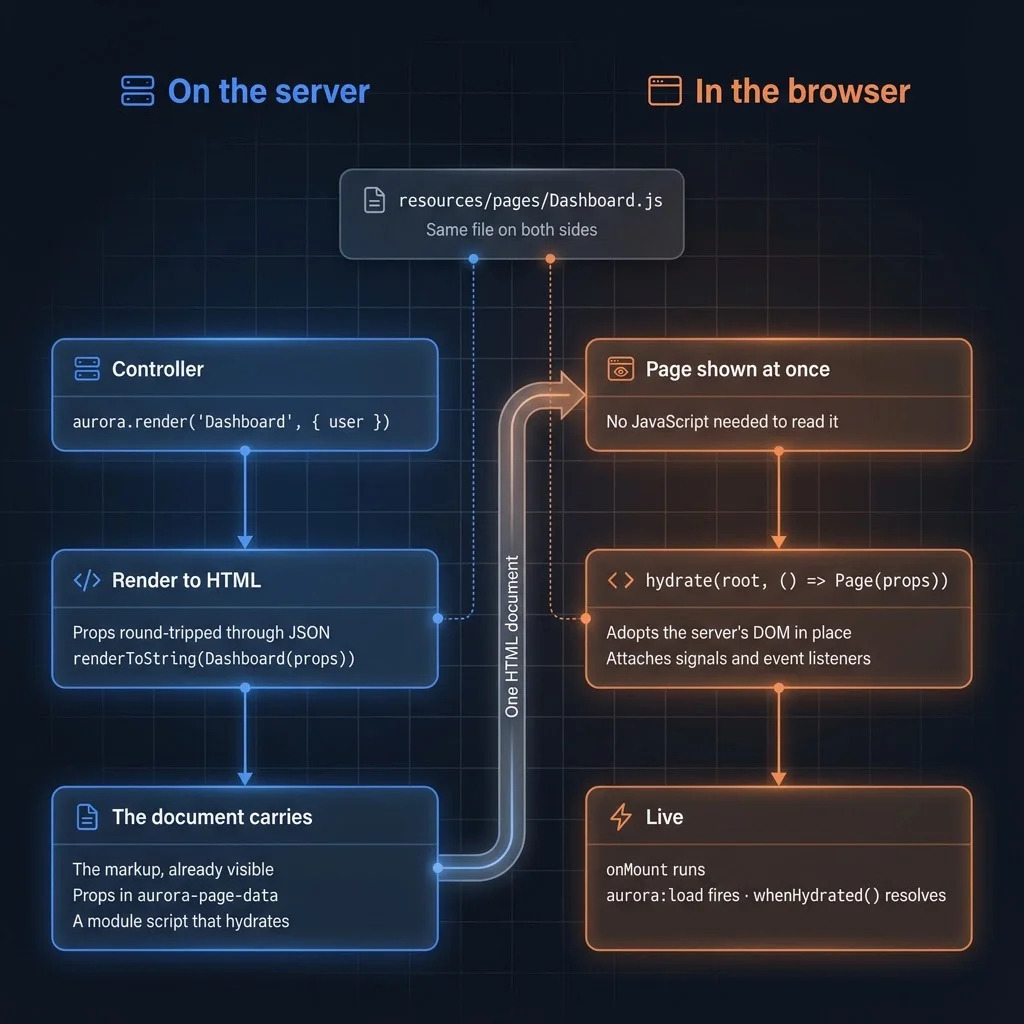
Shared pages — aurora.render()
One file per page, same source on the server and in the browser (plain ESM JS, no compile step).
Wire it up
ream configure @c9up/aurora writes these three pieces. By hand:
ts
// reamrc.ts
providers: [
  () => import('@c9up/aurora/provider'),
]
ts
// start/kernel.ts
router.use([
  () => import('@c9up/aurora/middleware'),   // first: binds ctx.aurora
  // ...the application's own router middleware
])
ts
// config/aurora.ts
import { defineConfig } from '@c9up/aurora/server'

export default defineConfig({
  pages: { root: 'resources/pages' },
  root: { tag: 'div' },
})
The middleware goes first so that any router middleware after it — a guard that renders a login page, say — finds ctx.aurora in place; it reads nothing from the request, so running ahead of the body parser and the session costs nothing.
Aurora's provider:
- defaults
pages.rootto<projectRoot>/resources/pages— drop your pages there and they're picked up; - serves
/__assets/aurora/*(the runtime's pre-builtdist/); - serves
/__assets/pages/*(your pages directory); - serves
/__assets/<package>/dist/*for every entry inbrowserPackages.
Those are server middleware, not routes, served ahead of routing. A page ships unbundled, so one page load is dozens of .js requests: as routes they each traversed your middleware stack, and an application that resolves a user from a session cookie paid a SELECT per file for bytes that are identical for every visitor. Served ahead of routing, they never reach your kernel — and you never have to write the exemption yourself. Only GET and HEAD are claimed; anything else falls through to your routes.
A path with a segment that starts with . — .env, .git/config, an editor's swap file — is a 404 on every mount, a link that points at one included: the pages mount is your source directory. serveAssets({ root, dotFiles: "allow" }) serves them on a mount of your own.
To use a different folder, change pages.root in config/aurora.ts:
ts
import { defineConfig } from '@c9up/aurora/server'

export default defineConfig({
  pages: { root: './app/views' },
})
pages.root is resolved against the project root (same convention modules.path uses in reamrc.ts). Absolute paths pass through unchanged.
Author a page
js
// resources/pages/Dashboard.js
import { component, html, onMount, signal } from '@c9up/aurora'
import { relay } from '@c9up/aurora/relay'

export default component((props) => {
  const status = signal('idle')

  onMount(() => {
    return relay().subscribe(props.channel, (ev) => {
      status(`last: ${ev.event}`)
    })
  })

  return html`<main>
    <h1>${props.title}</h1>
    <aside data-status="${() => status()}">${() => status()}</aside>
  </main>`
})
relay() is one stream per page. Its uid comes from the stream's first connected frame only — a later one on the same stream is ignored — and after a drop the reconnected stream's own. The relay binds a stream to the user and session that opened it, so a stream opened before a login is refused (E_RELAY_NOT_OWNER): the client then opens a new stream and subscribes its channels again, once. A connection refused for a cap (E_RELAY_MAX_CLIENTS, E_RELAY_MAX_CLIENTS_PER_OWNER) counts as one failed reconnect attempt, within configureRelay({ maxReconnectAttempts }). A broadcast payload is JSON — a string arrives as the string — and one that is not is dropped with a warning.
Off the browser, configureRelay({ stream, fetch }) hands relay the platform's event stream and requests: an app on a phone has no EventSource and no page origin, and passes the ones orbit's server connection gives.
Render it from a controller
ts
import aurora from '@c9up/aurora/services/main'

router.get('/dashboard', async (ctx) => {
  await aurora.render(ctx, 'Dashboard', {
    title: 'Hello',
    channel: 'user/123/notifications',
  })
})
That's it. aurora.render(ctx, name, props):
Resolves
resources/pages/${name}.js(dynamic import — picks up edits to the page file on the next request; see Dev live-reload for its transitive imports)Calls the factory with
propsas the browser will receive them — round-tripped through JSON, so aDateis its ISO string and a model is what itstoJSON()returns (so the columns it hides are absent) — and runs SSR viarenderToString. Server and browser render from the same data, so a page never hydrates against values it did not have on the server.Wraps the markup in a full HTML document with:
- the importmap that aliases
@c9up/aurora→/__assets/aurora/index.js - a
<script type="application/json" data-aurora-page>blob carrying{ name, props, url, rootId }, first in the<body>, before the root - an inline
<script type="module">that imports aurora + the same page module and callshydrate(root, () => Page(data.props))
The bootstrap reads the data with
document.querySelector('script[data-aurora-page][type="application/json"]'). Only that script matches: an element of your page cannot take its place, even one whoseidand text come from data. Read it the same way if your own code needs the page data.- the importmap that aliases
Browser-side, aurora adopts the SSR DOM in place, attaches signals + event listeners + lifecycle hooks. The onMount callback you wrote fires once the tree is live.
Context-bound — ctx.aurora.render(name, props)
ctx.aurora.render(name, props) is the ctx-bound sugar. The ctx is already captured, so a controller renders a page without threading it through:
ts
async show({ aurora }) {
  return aurora.render('Dashboard', { user })
}
ctx.aurora is attached by the @c9up/aurora/middleware router middleware that ream configure puts first in start/kernel.ts (see Wire it up) — reamrc.ts has no key for it. Without it, ctx.aurora is undefined. It is a no-op when no aurora manager is registered, so it is safe to mount unconditionally.
The same middleware is exported as a function, auroraContext from @c9up/aurora/server, for the places that take an inline middleware — the server tier, a route or a group (the router tier takes lazy imports only):
ts
// start/kernel.ts
import server from '@c9up/ream/services/server'
import { auroraContext } from '@c9up/aurora/server'

server.use([auroraContext])
auroraContext IS the (ctx, next) middleware, not a factory: calling it here would run it with no context at all, while the file is being loaded.
The module-level aurora.render(ctx, name, props) (the agnostic core) still works exactly as shown above — ctx.aurora.render(name, props) is just the ctx-bound shorthand over it.
Options
| Option | Default | What it does |
|---|---|---|
lang | 'en' | <html lang="…"> value |
rootId | 'aurora-root' | id of the <div> that wraps the SSR body — must match what your client side expects |
headExtra | '' | Raw HTML spliced into <head> after the importmap. Use for <title>, meta tags, stylesheets |
jsonLd | — | The page's structured data: a schema.org node, a list or a { "@context", "@graph" } document (what @c9up/ephemeris builds, or any plain object). Written in <head> as <script type="application/ld+json"> with the request's nonce, escaped so no value can end it — prefer it to building the tag into headExtra, which is written raw |
importmap | { "@c9up/aurora": "/__assets/aurora/index.js" } | Extra entries to merge into the page's importmap |
Why plain JS (and not TS)?
Because the same module must load in Node AND in the browser, without a build step on the app side. Aurora's package itself ships JS in dist/ and is loaded via the importmap. Your pages live in resources/pages/*.js and are loaded the same way. If you want types on a page, write a .d.ts next to it — your editor will pick it up; the runtime stays JS.
Dev live-reload (HMR)
Development behaviour — page reloading, page assets served no-cache, the dev warnings — is on only when the environment says so: ream dev (REAM_DEV=true), or a NODE_ENV of development, dev, develop, test or testing (any case). An unset NODE_ENV, production, prod, staging or any other value runs as production: the pages tree is not walked on each render and page assets keep their cache TTL.
Pages are dynamic-imported per request, so aurora dev-busts the page module by mtime — a direct edit to resources/pages/Foo.js shows up on the next request with no restart. But a page's transitive imports (the components, layouts and services it pulls from resources/pages/** subfolders) resolve to stable URLs that Node's ESM loader caches for the whole process lifetime. Edit one of those and the SSR HTML stays stale (with a hydration warning) until you restart.
The sharpest form of this trap is an export that exists on disk but not in the loaded module. Add a function to services/portfolio.js, use it from a page, and the request fails with:
The requested module './services/portfolio.js' does not provide an export named 'amountParts'The export is right there in the file. The page was re-read; the module it imports was not. If your e2e suite passes on the same code — it starts a fresh process each run — that is the confirmation. Restart, or wire hot-hook below.
hot-hook closes this gap — a Node loader-hook that tracks the ESM graph and invalidates a boundary's entire subtree on change. Wire it into your app; aurora itself needs no change (its computed import() is already graph-aware compatible, and its dev ?v= mtime bust coexists with hot-hook's own versioning):
bash
pnpm add -D hot-hook @hot-hook/runnerjsonc
// package.json
{
  "scripts": {
    "dev": "hot-runner --node-args=--import=tsx --node-args=--import=hot-hook/register bin/server.ts"
  },
  "hotHook": {
    "boundaries": ["./resources/pages/*.js"]
  }
}
Now editing a page or any component/layout/service it imports hot-reloads the SSR with no restart. Edits outside the pages tree (app/, config/, start/, providers/) trigger a full restart via hot-runner, exactly as before.
Point
boundariesat page entries only —./resources/pages/*.js(direct children), not**/*.js. hot-hook requires every file matchingboundariesto be dynamically imported; a component that is statically imported but happens to match the glob is flagged "wrongly imported" and forces a full reload. Keep pages as direct children ofresources/pages/and components in subfolders (atoms/,molecules/, …) — they become hot-reloadable as downstream deps of a page boundary.
Serving another package to the browser
@c9up/comet and @c9up/chronos are served already — aurora's own optional peers. Anything else an app imports by bare specifier without a bundler goes in one line:
ts
// config/aurora.ts
import { defineConfig } from '@c9up/aurora/server'

export default defineConfig({
  browserPackages: ['@c9up/atom'],
})
Each resolved package gets <assetsPrefix>/<name>/dist/*, a wasm/* route when it has one, and an importmap entry. A package that is not installed is skipped in silence.
The importmap entry is read from the package's exports (its "." entry), preferring the browser condition, then import, then default, wherever each is listed: a page is read by a browser only, and a package that ships a separate browser build has an import entry that reaches for node:fs. A TypeScript target (a workspace package exporting ./src/index.ts) is passed over. Without a usable exports, the entry is dist/index.js. A declared entry that sits outside dist/ — the only directory served — is refused with an error naming it: map that package yourself with importmap in config/aurora.ts.
The mount is two narrow roots, never the package root: a wasm-backed package imports ../wasm/… — a sibling of its dist — and the bindgen glue then fetches the binary beside itself, so the importmap points INTO dist/ for that relative path to land on the sibling route. Serving the package root would answer both and also publish index.*.node, server-only binaries measured in tens of megabytes. A package whose entry sits at its root (./index.mjs beside its package.json) has no such narrow directory, so it is refused at boot with an error naming it: leave it out of browserPackages and map it with importmap onto a mount of just the files the browser needs.
Catching an aurora failure
Every error aurora raises carries a stable code, and is an instance of the class of that name in the errors export, so a caller can branch on what went wrong without matching a message — prose is free to improve, a code is a contract.
js
import { errors } from '@c9up/aurora'

try {
  await pages.resolve('Dashboard')
} catch (error) {
  if (error instanceof errors.E_AURORA_PAGE_NOT_FOUND) {
    // …
  }
}
E_AURORA_PAGE_NOT_FOUND means no file for that name. E_AURORA_PAGE_IMPORT_FAILED means the page is there and its module graph refused to load — a syntax error anywhere in it, a throw at module top level, an export missing from something it imports. The two used to be reported as one, against the page's own path, which sent the reader to the only file that was certainly fine.
The original failure is always attached as cause, so the stack that points at the line survives.
Page visits — visits: true
By default every link loads a whole document: the server renders the page and the browser hydrates it again. With visits on, only the first load does. After it, a same-origin link asks the server for the next page's object as JSON and the client renders it into the root — the document, the importmap, module state and anything outside the root stay. It is photon's protocol (Inertia's), spoken by aurora: @c9up/photon builds the page objects and its client router drives the visits.
bash
pnpm add @c9up/photonts
// config/aurora.ts
export default defineConfig({
  pages: { root: app.makePath('resources/pages') },
  visits: true,
  assetsVersion: process.env.BUILD_ID,  // a deploy reloads clients on an older build
})
Controllers do not change: aurora.render(ctx, 'Dashboard', props) answers a first load with the document and a visit (X-Photon: true) with the page object. aurora's middleware adds what the protocol answers around a page: Vary: X-Photon, a 409 that makes a client on an older build load the document again, a 303 after a PUT / PATCH / DELETE that redirected.
What comes with the protocol works as in photon: partial reloads, defer(), merge(), once() and optional() props (import them from @c9up/photon), back and forward restored from history, router.visit() / router.put() from @c9up/photon/client. Props must be an object; title in the render options becomes the page's <title> and follows a visit.
- Links: every same-origin
<a href>is followed as a visit.data-photon="external", atarget, adownloador a modified click leaves one to the browser. - A visit leaves the page first: its components' effects and
onUnmount, and the live components it opened (liveClient), end before the next page renders. Code of yours that must end with the page registers withonPageLeave(end). - A visited page's module is imported once, then served from the module cache. The importmap is the first document's: a page that needs a specifier only its own per-call
importmapadds must be reached with a full load.
Knowing when the client has taken over
hydrate() announces itself, so nothing has to guess or poll.
js
import { whenHydrated, hydrationState, hydrationErrors } from '@c9up/aurora'

document.addEventListener('aurora:hydrate', (e) => e.detail.container)  // per root
document.addEventListener('aurora:load', () => {})                       // page settled

await whenHydrated()        // resolves at once if it already has
hydrationState()            // 'pending' | 'hydrating' | 'hydrated'
hydrationErrors()           // what failed, if anything
aurora:hydrate fires on each root as it is adopted and bubbles, the way turbo:frame-load and htmx:load do per fragment. aurora:load fires once on document after the last root settles — a page with several islands announces itself when all of them are in, not when the first one is.
Two deliberate differences from the runtimes this is modelled on:
The event fires even when a root throws, with the reason in detail.error and in hydrationErrors(). A signal withheld on failure turns a race into a silent hang, and whoever is waiting cannot tell the two apart.
There is a readable state beside the event. An event alone carries the race it exists to remove: attach a listener after it fired and you wait for ever. whenHydrated() resolves immediately when the work is already done — the same arrangement the DOM uses with document.readyState beside DOMContentLoaded. It never rejects; a failed root still settles the page.
A client-side navigation hydrates again, and the state returns to hydrating before settling once more. Turbo re-fires turbo:load on every visit for the same reason: being ready once is not being ready.